

Answer first
Codex Sites matters because it turns agent-generated work into a hosted, shareable product surface. The best first use case is not a public marketing site. It is the internal tool, dashboard, tracker, planner, or review hub that would otherwise stay trapped in a spreadsheet, doc, or one-off prototype.
What OpenAI Actually Launched
On June 2, 2026, OpenAI announced Codex updates for broader knowledge work, including role-specific plugins, annotations, and Sites. In that announcement, OpenAI described Sites as a preview capability for creating interactive hosted websites and apps that can be shared with a workspace by URL.
The official Codex Sites documentation is more precise:
- Sites lets Codex create, save, deploy, and inspect hosted websites, web apps, and games.
- Sites is currently in preview for ChatGPT Business and Enterprise workspaces, with more plans rolling out later.
- Enterprise workspaces need an admin to enable Sites through role-based access controls.
- Business workspaces have Sites enabled by default.
- You can install the Sites plugin in the Codex app and invoke it explicitly with
@Sites. - Every Sites deployment URL is a production deployment, so a reviewable build should be saved as a version before it is deployed.
That last point is the one teams should underline.
Sites does not just create a pretty preview. It can publish a real hosted URL. That makes the feature useful, but it also changes the level of responsibility.
The Real Shift: From Artifact to Workspace Tool
The transcript-style demos around Sites naturally focus on "one prompt creates a website." That is impressive, but it undersells the release.
Lots of AI tools can generate a landing page or a React mockup. The harder product problem is what happens after the draft exists:
- Can the team open it without cloning a repo?
- Can access be limited to the right workspace users?
- Can the app remember real data between visits?
- Can the owner review the source and deployment version before sharing?
- Can the site become the place where a workflow happens, not just a screenshot of the workflow?
That is where Sites becomes interesting.
It gives Codex a deployment and sharing surface. In practice, that means Codex can move from "I made a prototype" to "I made a small internal app your team can use."
The Better Mental Model
Do not think:
AI website builder.
Think:
A shareable app surface for agent-built work.
That distinction changes what you ask Codex to build.
Weak prompt:
@Sites Build me a beautiful dashboard.
Better prompt:
@Sites Build a workspace-authenticated revenue review dashboard for the sales leadership team.

The dashboard should help managers review pipeline health before the Monday meeting.
Show total pipeline, weighted pipeline, at-risk deals, stage breakdown, and owner breakdown.
Let users filter by date range, owner, stage, and deal status.
Persist saved notes and review actions between visits.

Use D1 for structured review data.
Keep access limited to owner and admins until I review the saved version.
Validate the build, save a version for review, and do not deploy until I approve it.
The second prompt gives Codex the product job, audience, data behavior, storage need, access posture, and deployment instruction.
That is the difference between a mockup and a tool.
The Six-Part Sites Prompt Formula
Use this structure when prompting Sites.
| Prompt part | What it clarifies | Example |
|---|---|---|
| Audience | Who the app is for | "Operations managers reviewing open requests" |
| Workflow | What users need to do | "Submit requests, assign owners, update status, filter by priority" |
| Data source | Where data comes from | "Use connected CRM deals" or "Use uploaded CSV" |
| Persistence | What must be remembered | "Save requests, comments, and status changes between visits" |
| Access | Who can open it | "Workspace-authenticated users only" |
| Release step | Whether to save or deploy | "Save a version for review before deployment" |
Most bad Sites prompts fail because they describe the UI but not the workflow.
The UI is the wrapper. The workflow is the reason the app should exist.
Example 1: Request Dashboard
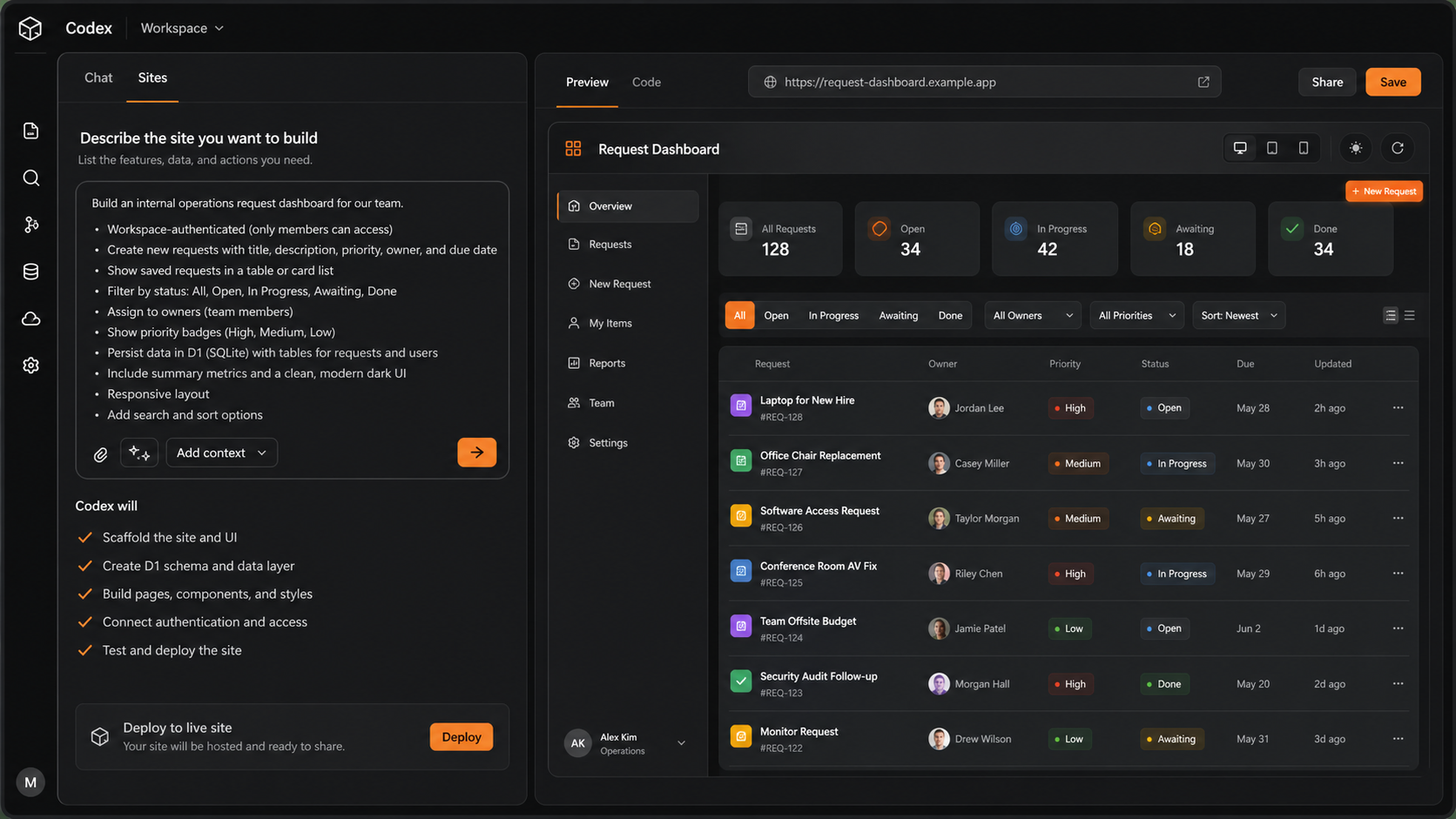
A request dashboard is the cleanest first Sites project because the data model is simple and the workflow is real.
The team needs to:
- create requests
- assign owners
- update status
- filter the list
- preserve the request history
- restrict access to the workspace
That maps naturally to Sites because OpenAI's docs explicitly call out saved records, workspace-authenticated identity, and durable structured data as supported site shapes.
Use this kind of prompt:
@Sites Build an internal operations request desk for our team.

Users should sign in with their workspace account.
They can create requests with title, description, priority, owner, due date, and status.
Show list and board views.
Include filters for owner, status, priority, and due date.
Persist request data and status history between visits.
Use D1 for structured request data.

Save a reviewable version first. Do not deploy until I confirm the access settings and production URL.
The useful output is not a generic project-management clone. The useful output is a workflow-specific request desk that matches the team's operating language.
Example 2: Sales Pipeline Tracker
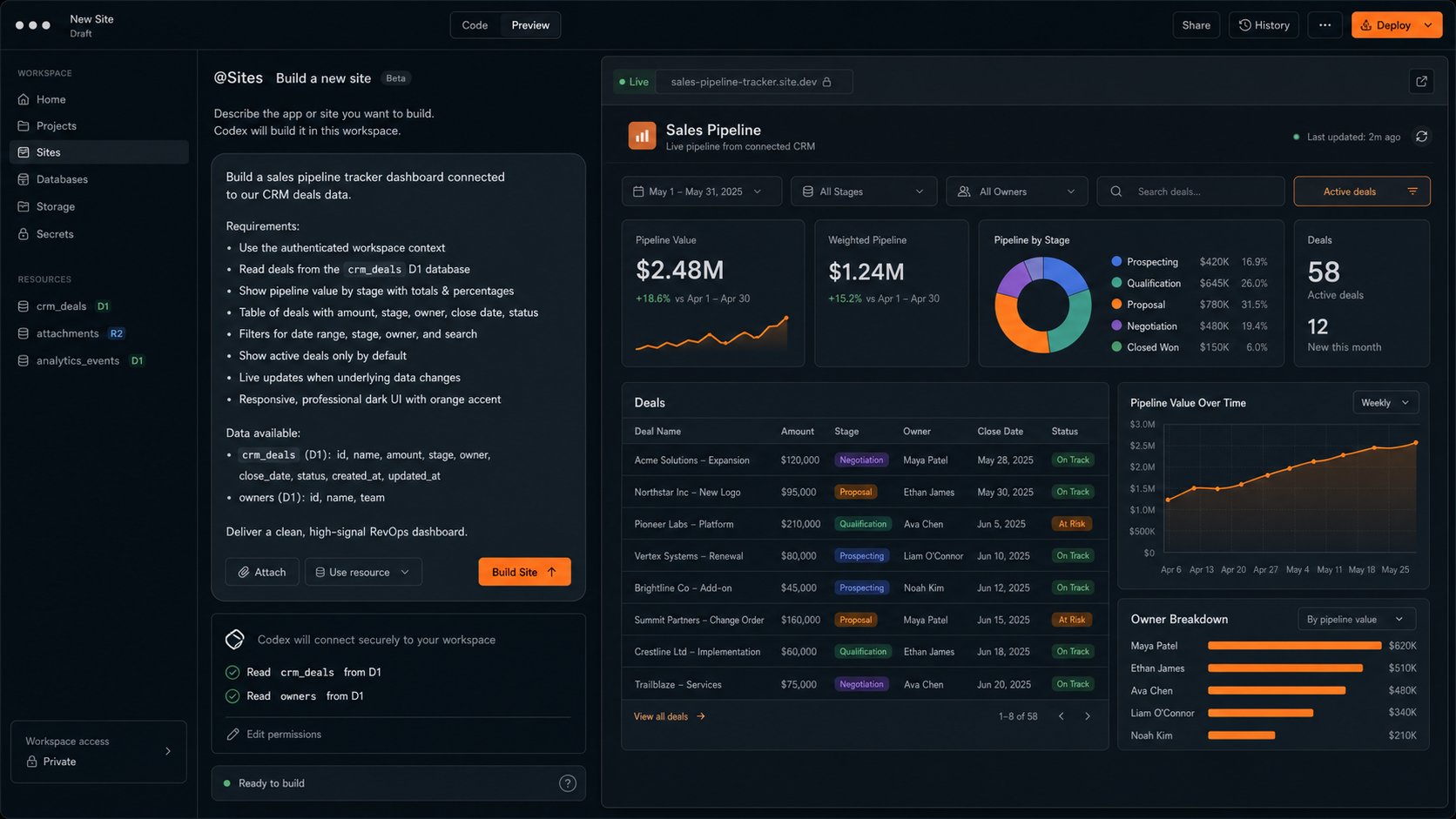
Sites becomes more valuable when it can sit on top of context from another system.
For example, a sales pipeline tracker is useful when it reads deals from the CRM, then adds a lightweight review layer:
- stage mix
- weighted pipeline
- owner breakdown
- stale deals
- forecast risk
- meeting notes
- next-step commitments
The mistake is to ask for "a dashboard." Dashboards are easy to make and easy to ignore.
Ask for the operating review instead:
@Sites Build a sales pipeline review workspace for the leadership meeting.

Read deal name, amount, stage, owner, close date, and status from the connected CRM data available in this workspace.
Show total pipeline, weighted pipeline, stage breakdown, owner breakdown, and at-risk deals.
Let users filter by owner, stage, close month, and deal status.
Add a review notes panel where managers can save next actions for each deal.
Persist notes and review status between visits.

Keep source CRM data read-only. Store only review notes and workflow state in Sites storage.
Save a version for review before deployment.
That "read-only source, writable review layer" distinction is important.
Sites should not casually become the source of truth for your CRM. It can become the meeting layer that helps the team act on CRM data.
Example 3: Event Operations Hub
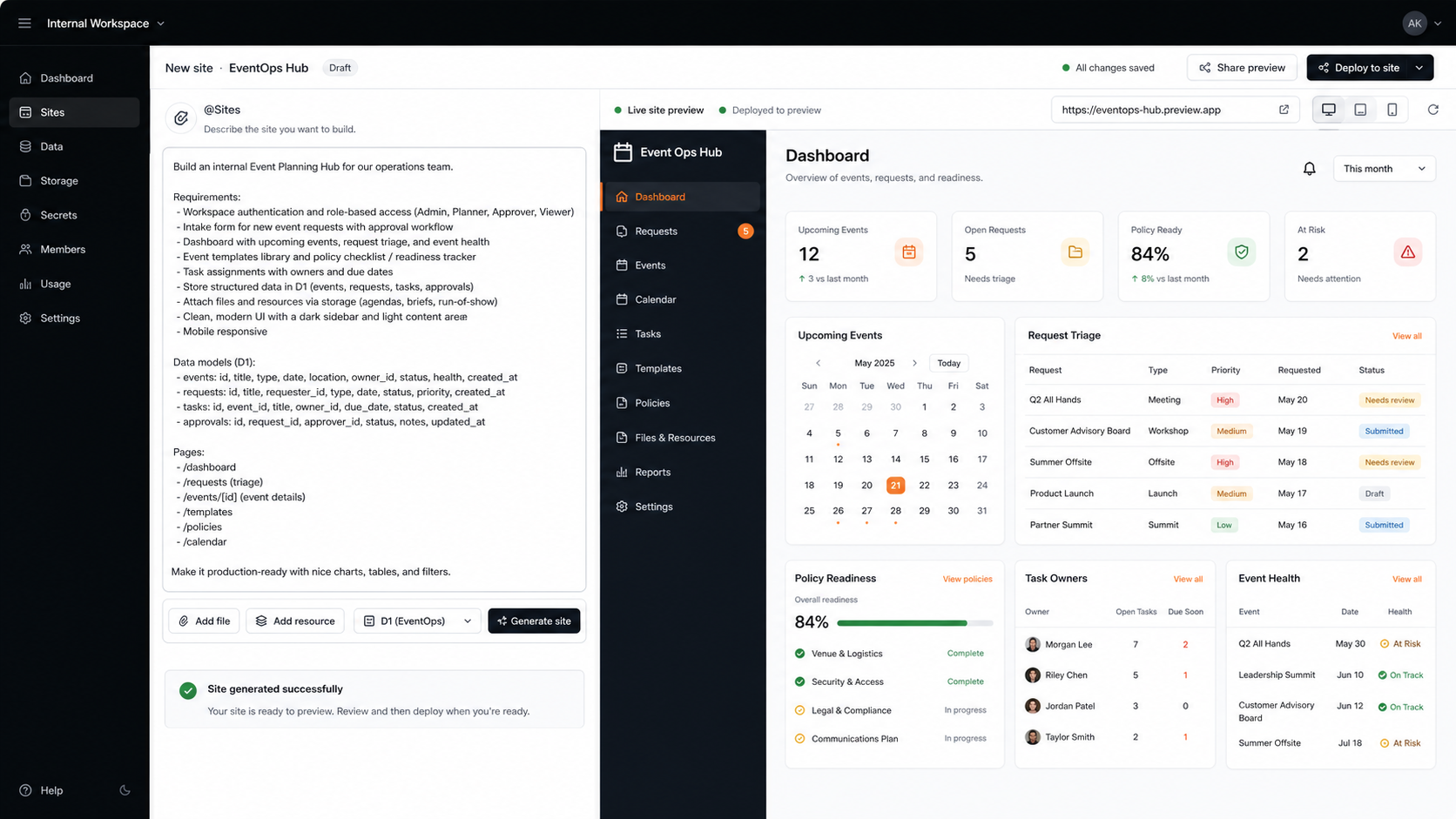
Event operations is a good Sites use case because the work is cross-functional and usually scattered across docs, sheets, calendars, and chat.
A useful event hub might include:
- intake requests
- approval status
- event calendar
- task owners
- vendor checklist
- run-of-show files
- readiness score
- risk flags
- post-event notes
Use a prompt that separates structured data from files:
@Sites Build an internal event operations hub.

The team should be able to submit event requests, approve or reject them, assign owners, track tasks, and see upcoming events on a calendar.
Persist event requests, approvals, tasks, and readiness status.
Support file uploads for agendas, briefs, vendor notes, and run-of-show documents.

Use D1 for structured event records and R2 for uploaded files.
Use workspace authentication.
Start with owner and admin access only.
Validate the build and save a version for review before publishing.
This is the type of app that often never gets built by an engineering team because it is too small to prioritize. Sites lowers that threshold.
Choose the Right Sites Shape
OpenAI's Sites docs are explicit that you should tell Codex what product behavior you need so it can choose the right app shape.
| Need | Ask for |
|---|---|
| Static microsite, explainer, launch page, or gallery | No durable app state unless truly needed |
| Saved records, progress, comments, scores, or workflow state | D1 relational database |
| Images, PDFs, audio, video, or other uploads | R2 object storage |
| Uploaded files with searchable metadata | D1 for metadata and R2 for files |
| Internal app tied to the current workspace user | Workspace-authenticated identity |
| Public sign-in or external identity | Authentication-enabled Sites project |
Do not ask for persistent storage because it sounds impressive.
Ask for it when the user expects the hosted app to remember product data.
Why This Matters for AI Product Builders
Sites is another sign that "generate the thing" is becoming a platform feature.
We saw the same pattern with ChartsAI and DashDashGo. The original promise was useful: connect data, ask AI, get a dashboard. But as agents learned to create dashboards inside broader coding and knowledge-work environments, pure dashboard generation became less defensible as a standalone product.
Sites pushes that pattern further.
If an agent can generate, host, share, and update a small internal app, the value moves away from "we can build the UI" and toward:
- better workflow design
- trusted data connections
- access and permissions
- review and governance
- persistent context
- source-backed explanations
- adoption inside the team
The durable product is not the generated app shell.
The durable product is the operating system around the work.
Sites vs Lovable, Replit, Vercel, and Webflow
OpenAI says it is working with early partners including Vercel, Wix, Base44, Replit, Lovable, Figma, Webflow, and Emergent as it builds toward a Sites partner ecosystem.
That is the right framing. Sites does overlap with AI website builders, but it is not the same category in every use case.
Sites is strongest when:
- the app is small but useful
- the audience is your workspace
- the workflow benefits from Codex context or plugins
- you need a hosted URL quickly
- workspace identity and simple access control matter
- the app can be reviewed and iterated in Codex
Specialized builders and deployment platforms still matter when:
- the site is a major public brand surface
- the app needs custom infrastructure
- the product needs a full engineering lifecycle
- the team needs mature observability, rollbacks, environments, or compliance controls
- the app is customer-facing and revenue-critical
So the practical answer is not "Sites replaces everything."
The practical answer is:
Sites expands the set of useful internal apps that are now cheap enough to build.
The Review Checklist Before You Share
Because every Sites deployment URL is production, teams should treat deployment as a release step.
Before widening access, follow a checklist:
- Review the source changes and any database migrations in the Codex review pane.
- Confirm that the build succeeded.
- Confirm that the saved version is the one you intend to publish.
- Check who can access the site.
- Store runtime secrets in the Sites panel, not source files.
- Ask Codex to confirm deployment status and production URL before sharing.
This is not bureaucracy.
It is the minimum process for turning generated software into shared software.
What I Would Not Build First
Sites is exciting, but the safest first projects are lightweight internal tools.
I would not start with:
- regulated production workflows without human review and audit controls
- customer-facing apps that need formal uptime commitments
- replacements for systems of record such as CRM, HRIS, accounting, or ticketing
- apps that write back to critical systems before the data model is inspected
- dashboards that make decisions from unverified AI-generated data
- public brand pages where design quality and performance are the whole product
Start with tools that help a team think, review, coordinate, and decide.
Then harden the ones that become important.
A Better First Prompt
If you want to try Sites seriously, start here:
@Sites Build a workspace-authenticated internal app for [team] to manage [workflow].

The primary users are [roles].
They need to [top 3 actions].
The app should show [critical views, metrics, or records].
It should read data from [source] and should only write [specific state].
Persist [records/comments/status/files] between visits.
Use [D1/R2/neither] based on that storage requirement.

Keep access limited to owner and admins while I review it.
Validate the build.
Save a deployable version for review.
Do not deploy until I approve the version and access settings.
That prompt is not trying to sound clever.
It gives Codex the boundaries that make a generated app useful.
Primary Sources and Further Reading
- OpenAI: Codex for every role, tool, and workflow for the June 2, 2026 announcement of Sites, plugins, and annotations.
- OpenAI Codex Sites documentation for availability,
@Sitesusage, save vs deploy behavior, supported site shapes, D1, R2, access, secrets, and review guidance. - OpenAI Sites showcase for example internal sites and prompts.
- OpenAI Codex plugins documentation for how plugins extend Codex with reusable workflows, app integrations, and MCP servers.
- OpenAI Codex review pane documentation for inspecting source changes before publishing.
The Bottom Line
Codex Sites is not important because it can make a web page.
It is important because it gives agent-built work a place to live, a URL to share, storage when needed, and access controls around the people using it.
That is a more useful primitive than another AI landing-page demo.
The winning Sites projects will be small, boring, high-leverage tools that make a team's real work easier to see, review, and move forward.